Daily Executive Brief Scheduled AI summary with deterministic delivery
Daily Executive Brief — the morning's email, sorted before the day starts
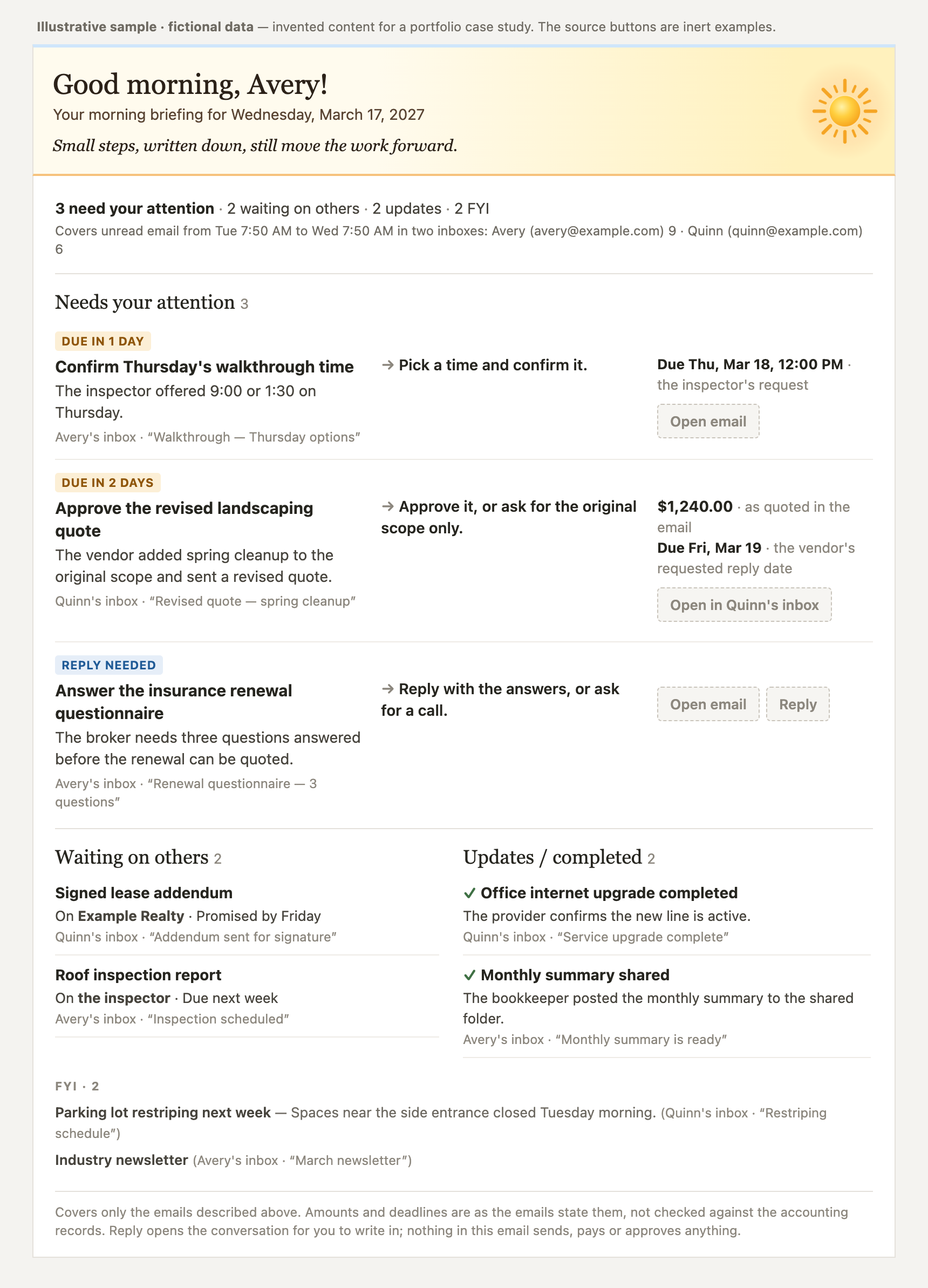
A briefing that arrives on a schedule each weekday morning: authorized email from two inboxes, summarized into what needs action, what is waiting on someone else, what was completed and what is simply worth knowing — with its sources, time window and limits visible on the page.

The problem
An operations leader starts the day facing two inboxes: their own, and one they help manage. Most messages need nothing; a few need a decision, a reply or an action today; some are waiting on someone else. Reading everything to find those few takes the first part of every morning.
The approach
- Gather, with permission. On a weekday schedule, the unread email that arrived in a fixed window is collected from the two inboxes, each through its own owner's authorization. If either inbox cannot be read, no partial brief is sent; a short notice says so instead.
- Summarize with AI. A language model turns the messages into structured data only — each item placed in Needs your attention, Waiting on others, Updates / completed or FYI, with short context, a suggested next step and any stated deadline or amount.
- Validate, format and deliver with ordinary code. Deterministic code checks the result against the original messages — every message accounted for and each item tied to a real message — then builds the email, its links and its layout, and sends it once. The model never writes the email itself, chooses links or decides whether to send.
Limits you can see
Each item names the inbox and subject it came from. The header line states the exact time window and how many messages each inbox contributed, and an inbox that could not be read is shown as not read — never as "no email". Amounts and deadlines are reported as the emails state them.
What it does not do
- It does not send replies: Reply opens the conversation for a person to write in.
- It does not pay bills, approve requests or change anything in another system.
- It does not verify what an email claims against accounting records.
- It covers unread mail in its window only — it is not a complete list of outstanding work.
Status
In use each weekday. The page and the sample above are static: there is no inbox connection, API call, send button or account authorization on this site.