Atlas Today Personal workspace prototype
Atlas Today — seeing the day's AI-assisted work at a glance
A personal dashboard I designed and use to see what my AI assistant is working on, what comes next, what changed today and which decisions are waiting on me — built from the records we already keep, so there is no second task list to maintain.
- Open the demo — an invented cartographers' guild, not a real workspace.
- Answer a decision on the Decisions tab and watch the simulated assistant pick it up and record it.
- Try Monitor, the second-screen view, and switch between the night study and the overcast morning.
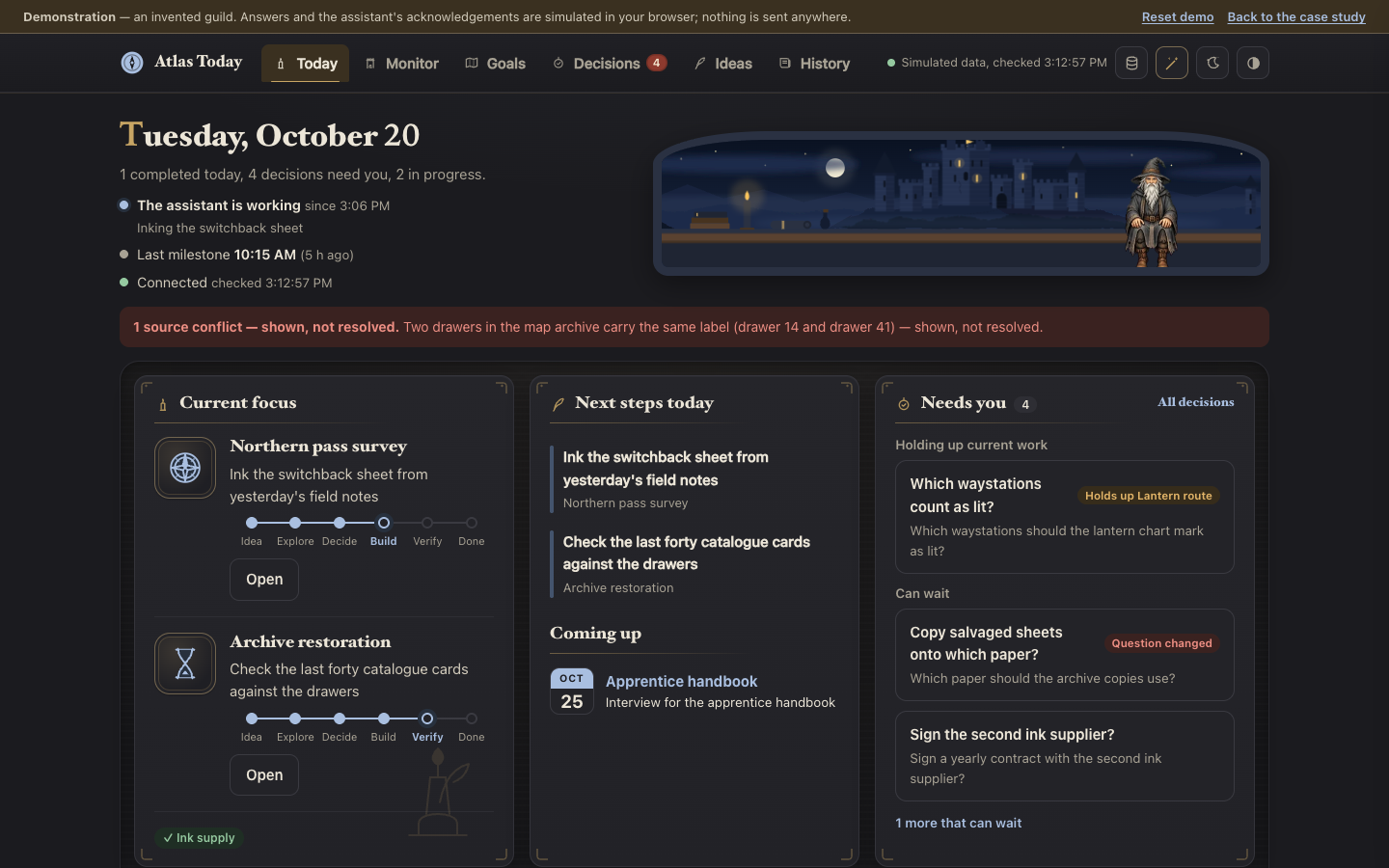
Demonstration: the dashboard's own front end with invented projects, people, decisions and history. Answers and acknowledgements are simulated in your browser; nothing is sent anywhere.
The problem
Working with an AI assistant all day produces a lot of motion: decisions made in conversation, checks run, changes released, questions left open. The written record keeps all of it, but reading the record is not the same as seeing the day. I wanted one calm screen that answers four questions — what is being worked on, what is next, what needs me, and what got done — without asking me (or the assistant) to keep a separate task list in sync.
Every item cites its source
The dashboard is a view, not a second authority. Each goal, workstream, question and idea points at the record it summarizes, and the builder checks that the quoted text is still there. When two records disagree, the page shows the conflict and leaves it unresolved. Completed work stays completed: an older record cannot quietly reopen it, and only a recorded decision or a release can mark something done. A source that cannot be read says so — it is never shown as an empty list.
Freshness you can trust
Three different things are easy to confuse, so they are shown separately: whether the page can reach its data, when the last milestone was recorded, and whether the assistant is working. The assistant's status comes only from an explicit signal it reports, with an expiry; if the signal is missing or has expired, the page says unknown rather than guessing. A signal left over from before the last end-of-day wrap-up reads as a finished session, never as current.
A decision inbox that waits for the record
Open questions carry their context, a recommendation, the alternatives and what each would mean. I choose an option, add a note and submit. The answer moves from submitted to being recorded, and shows recorded only after the decision has actually been written into the record. If the question changed after I answered, the answer is flagged as stale; a newer answer supersedes an older one; the assistant can ask for clarification instead of guessing. Choices that would spend money, change access or release something are recorded as intent only — they still need my explicit approval in conversation.
Monitor: a second screen
Monitor is a calm, distance-readable view for a second display: four columns — Working on, Next, Needs you and Completed today — with large type and nothing that demands attention unless something changed.
A personal visual design
Because it is my own workspace, it looks like somewhere I want to be. The default is a dark-fantasy study: a window looks out on a moonlit fortress, and Ashen — the wizard who appears across this site — sits at his desk, glancing toward what changed and idling between updates. Light mode is the same place on an overcast morning. A Magic switch turns the decorative animation off, an Atmosphere menu sets it to a still scene, subtle or fuller, and the page respects the system's reduced-motion setting; the artwork never sits behind text or controls. Each workstream has its own drawn medieval emblem. The pointer is an original gauntlet, drawn as simple line art: steel across the page and gilt over anything you can click, with the fingertip as the hotspot. Text fields and resize handles keep their usual cursors, and Atmosphere > Pointer > System switches back to your own pointer everywhere.
Status and limits
This is a personal workspace prototype that I use every day and keep refining. It runs locally on my own machine, and a private, read-only copy follows me to my phone: after each recorded step the validated snapshot is signed and published automatically, the copy shows when it last heard from the workspace, and after three working hours of silence it says so plainly instead of looking current. Decisions are still answered on the machine during this trial. Whether it would help other people is untested — it was shaped around one person's way of working with an AI assistant.