Case study 01 Operations platform
Hired to track budgets. Expanded into building the systems behind the work.
A property management and development company was running on people's memory, paper, email and whiteboards. In about three months it moved to one shared operations platform, and office, field, finance and leadership staff were onboarded to it by role.
The demo runs the platform's real interface and its own database inside your browser, holding only invented records. Sign-in and e-mail are simulated, and nothing leaves the page.
Watch the platform story · 4:46, narrated
What I built and how it works today, then where it could go next. Until 2:15 it shows working features; after that it covers planned direction, with a short look at today's bill and bank-review screens at 2:31, and from 3:22 a reporting concept that isn't built, labelled on screen.
Read the transcript
Thursday morning. The partners meet at nine, and there's one question on the table. Are this year's projects on track against their funding? Simple to ask. But for a long time, answering it meant gathering the pieces by hand: a spreadsheet here, an email thread there, a folder of receipts, and someone's memory.
Today, that work comes together in one operations platform: the app Nick built to connect the company's projects, work orders, financial records, and their history. Let's follow one project: a unit turn at Maple Court. In the unit, the field lead opens the work order on a phone, ticks off the work items, and adds photos. Back in the office, it moves from scheduled, to in progress, to completed, and everyone sees the same status. When the new range is bought, the receipt doesn't go into a drawer. It's attached to the bank transaction, given a category, and tied to the project. And the project's balance reflects it: the funds added, what's been spent, and what's still available.
Then time passes. The work is finished. The project is completed and archived. People move on to other roles. That's usually when knowledge starts to slip away: into old inboxes, spreadsheets nobody opens, and what someone used to know. Here, the record stays... right with the work. Project by project, and year by year, the company builds its own memory. And that memory is meant to be used. Months later, someone asks: why was the Maple Court funding corrected? The answer comes straight back: the original amount, the corrected one, the reason, and who made the change, with the receipts and photos still attached.
Leadership can already draw on that memory. Each project's report totals its spending by category, for any period you choose. And a project running low on funds is flagged. Those views are only as current as the latest recorded information, which is why recording the work, as it happens, matters.
And the platform is still growing. Some of the company's work still runs in separate spreadsheets, and tracking the company's bills used to be one of them. Now that's Post It 5.0: built, in use, and getting its finishing touches. In Post It 5.0, the team can track bills and plan funding in one place. In Bank Transactions, the bank connection shows the current balance and brings posted activity into a review queue each morning. A team member checks each item before posting it. The next step is to learn each remaining workflow with the people who run it, and bring it into the platform where it fits. Piece by piece, those workflows join one shared workspace, with less re-typing and fewer competing versions. The accounting itself stays in QuickBooks. Shared doesn't mean open to everyone. What each person sees depends on their role, the areas they've been granted, and the records in their scope, and the server enforces it, not just the screen. And everything recorded along the way adds to the company's memory: the foundation for what comes next.
Now, imagine what that foundation could support. Connect an AI assistant to that governed record, seeing only what each leader is permitted to see, and a plain request could become a finished report. Ask for a spending overview for the owner and partners: funds added, spending by category, what's left, and the work still open. It gathers the relevant records, builds the charts, and assembles the report, with every figure traced back to its source. Then refine it, the way you'd ask a colleague. Focus on the projects with low balances, and include the supporting detail. Five projects become two, with the transactions, the receipts, and the correction history right beside them. And a person still reviews it, and decides what goes to the partners.
So, back to Thursday morning. Today, the question has an answer: a clear picture from the project balances, and the evidence behind every number. Connected work, today. A lasting company memory. And, over time, insight on demand. It all starts with the work we record today.
- My role
- Business Systems Engineer — product owner for the systems described here
- When
- July 2026 – present
- Company
- Property management and development; small office and field team
- Built with
- Google Sheets, Apps Script, then a web platform on PostgreSQL · AI implementation
In one minute
- Problem
- Job status, follow-ups and budgets lived in memory, paper, email and whiteboards. Project balances took manual work to bring together.
- Decisions
- Agree definitions in a spreadsheet before writing software. Enforce access in the database, not the menu. Release in small, gated steps and roll out one role at a time.
- Delivered
- An internal platform for work orders, maintenance, leases and rent, bank transactions, project balances, bills and cash needs, and reports, with role-based home pages, two-factor sign-in and an audit trail.
- Outcome
- The old tools were retired and staff were onboarded by role. Impact is described from records and my own observation — it hasn't been measured.
- My part
- Requirements, workflow and screen design, priorities, directing AI implementation, testing and approving each release, onboarding and support.
The starting point
I was hired to handle budgeting on the project-development side. There was no operating framework to inherit and no formal onboarding, so the first job was understanding how work actually moved.
- Information was fragmented. Job status, vendor follow-ups and project details lived in people's memory, on paper, in personal task lists, in email and on whiteboards.
- Budgets took manual work. Project spending and receipts were tracked in several places, so a current project balance had to be assembled by hand.
- No shared daily view. Leadership couldn't see, in one place, what needed to happen on each project today.
These were process gaps, not people problems — a small company growing faster than its systems.
How it unfolded
- Start a written memory, then learn the business
Set up a documented knowledge base in late June, just before joining in July, then filled it while learning the business: decisions, definitions and open questions, so nothing important depended on anyone's memory — including the AI assistants'.
- An operations command center in a spreadsheet
Designed a shared workbook: projects and budgets, reserve funds, a daily work queue and executive dashboards. It gave leadership one view for the first time, and let us validate definitions cheaply before writing software.
- A web interface for the office and phones
A web front end over the workbook went live, first read-only, then with work-order intake and controls.
- Internal operations platform released
Built from late July: a proper database with role-based access enforced by the database itself, two-factor sign-in and an audit trail of who changed what. Released for internal office use.
- The spreadsheet's work moved in; the old tool retired
Work orders were imported from the workbook, reconciled, and the old interface was archived read-only so there was one source of truth.
- Rolled out by role, improved from feedback
Colleagues were onboarded one role at a time — operations coordination, field, finance and leadership, compliance — while fixes and features shipped in small releases.
- Finance features people asked for
Expense categories on bank transactions, one-page project summaries, project-balance warnings, refunds, an Excel export and spending reports.
- From features to reliability
A watcher for the system's own scheduled jobs, released with its blind spots written down, and a records-retention policy that keeps business history while letting technical logs expire.
- The bills spreadsheet moved in: Post It 5.0
The company's bills tracker, until then a spreadsheet, became a module of the platform: bills and the cash to cover them by entity, account balances pasted from the bank's own list, date windows, a review step, and the monthly funding request. In use, with refinements continuing.
- Navigation rebuilt, phones first-class
A slim work-area rail with each area's pages and favorites beside it; on phones, a bottom bar for Home, Favorites, Search and Menu. The Dispatch Center got its own header artwork, and budget-request lines now pick a project with its available balance shown.
- The monthly budget request, end to end
The request now goes all the way round: contingency set per line, a standing reserve line, one action to mark it sent that freezes a numbered revision, approved amounts entered line by line, and a history of every month with a PDF of exactly what was sent. Reimbursements open the records behind an entity's month.
- Bills funded by source, and access you can see
In Post It 5.0, each entity is assigned the source that funds its bills; billing cycles move to the 9th through the 8th, with a one-time December bridge so no bill falls between cycles; payments sent but not yet cleared are shown for reference; and the budget is grouped by funding source, with a matching PDF. Administrators got a permissions editor: each person's access, where every permission comes from, and changes saved with a reason — still enforced by the database.
- Residential work that is safe to repeat
Lease onboarding can be retried without creating a second lease; tenants are marked former and restored instead of deleted; rent follow-ups get dates instead of a status to remember; a lease's status now follows its recorded dates; a tenant's notice can be withdrawn or its final day corrected, with the approval recorded; deposit settlements recorded in error are voided with a reason; rent differences wait in a review list instead of being changed silently.
- Built from the finance lead's own feedback
Her landing page now opens with what she acts on — accounts still needing today's balance and unpaid bills due this week, each one click from exactly those records — while project balances stay one step away in the menu. The bank-balance paste now accepts her own account list: an account whose nickname differs but whose last four digits are unique is proposed, and is only saved after she accepts the match.
How the system works
One platform, organized around how the company works rather than around software modules:
Live for internal staff (November 2026)
- Work orders
- Maintenance intake
- Leases & rent
- Bank transactions
- Project balances
- Bills & cash needs (Post It 5.0)
- Monthly budget requests
- Reports & Excel export
- Role home pages
- Permissions editor
- Two-factor sign-in
- Audit history
- Scheduled-job monitoring
- Personal workspaces. Each person lands on a page built for their job — a phone-first work queue, an assigned-work view for the field lead, a financial overview for finance, a leases view for compliance.
- Access by role, enforced by the database. Hiding a menu is never treated as security; every restriction is enforced server-side, and people can request extra access that an administrator approves. Administrators can see each person's access, where every permission comes from, and change it with a reason.
- History you can trust. Every meaningful change records who did it and when, written by the system, never by the browser.
The platform today
Screens from the platform's own interface, running on a browser-local demonstration database with invented records. Company name, logo and people are replaced; nothing here is real data.
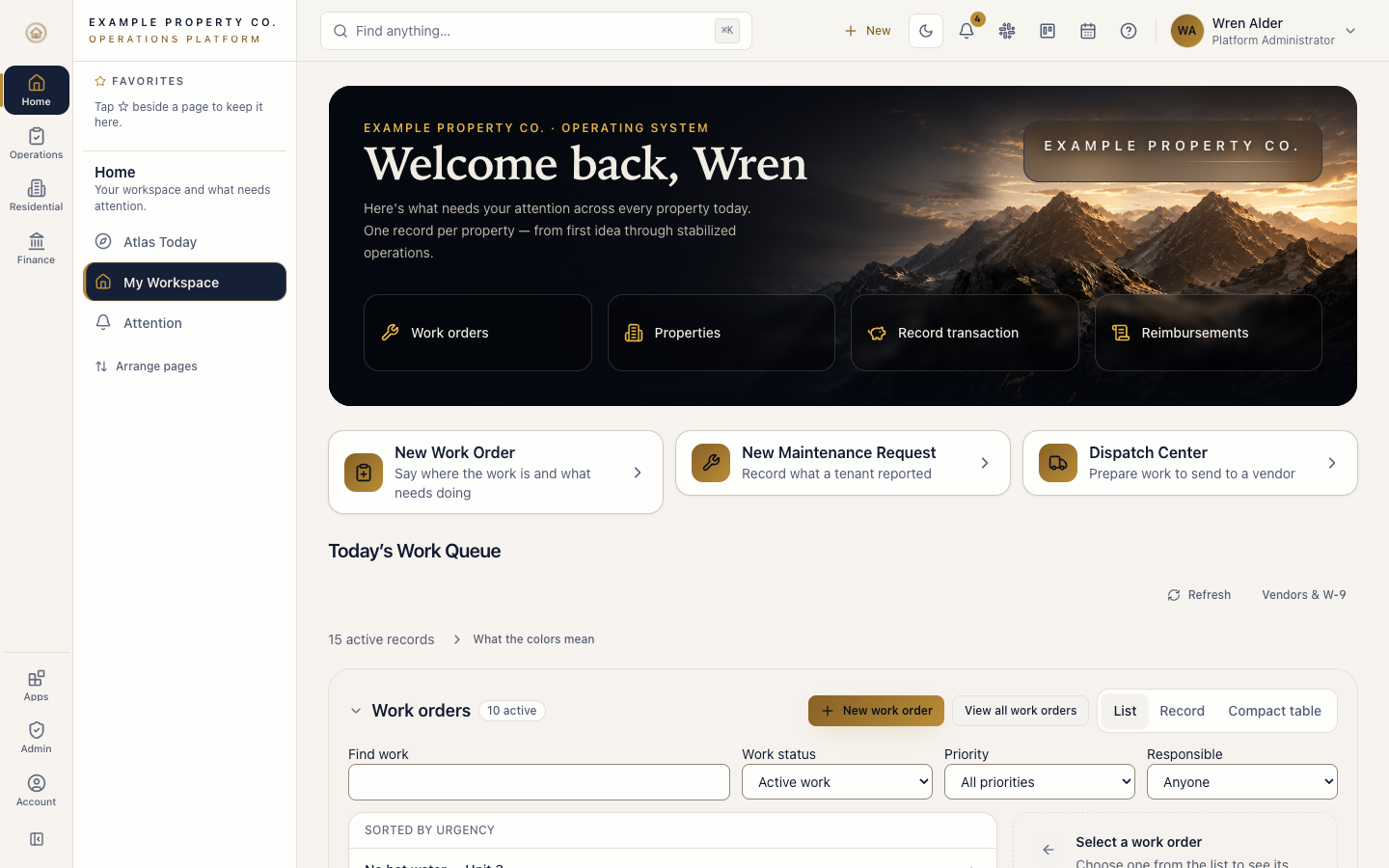
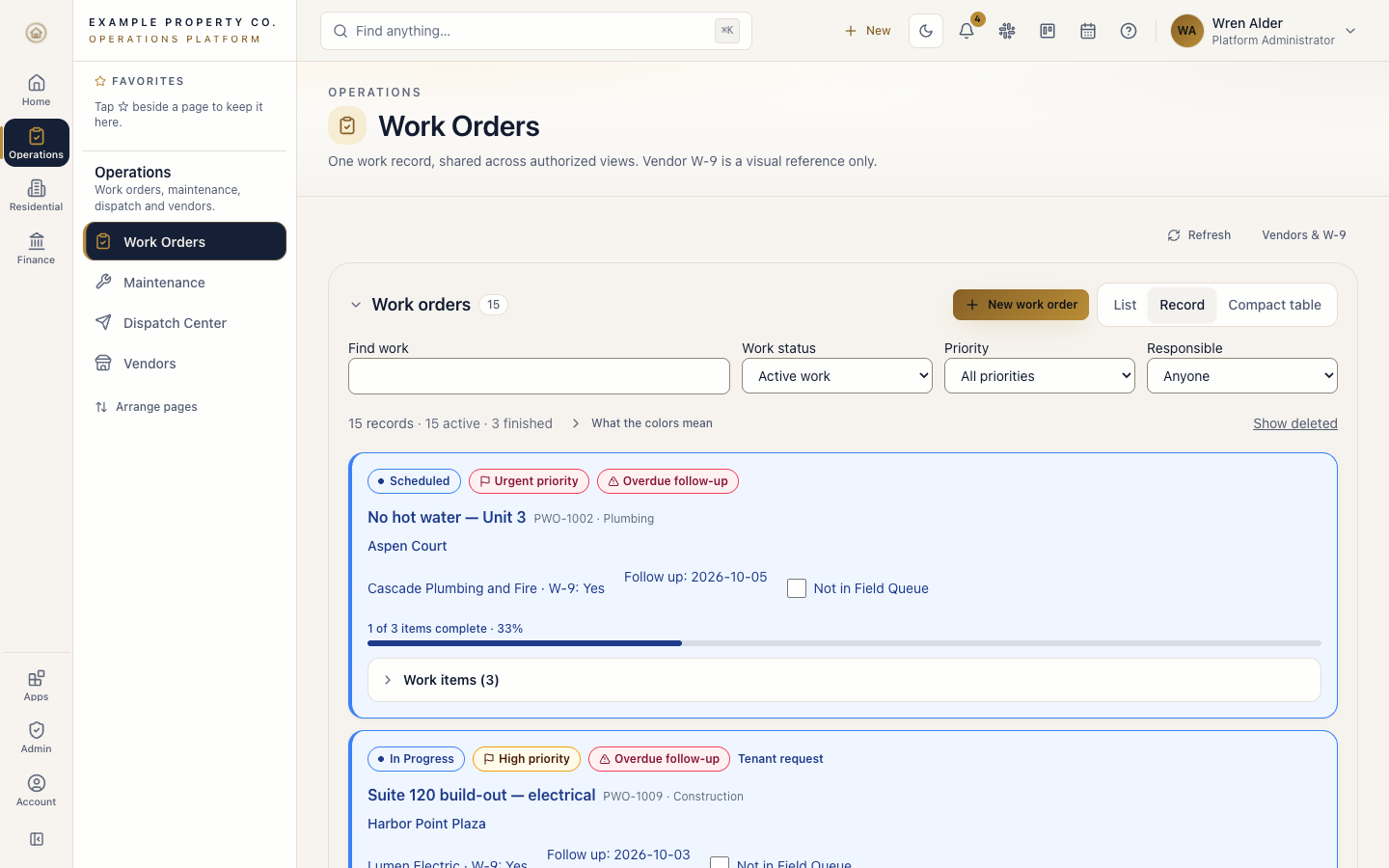
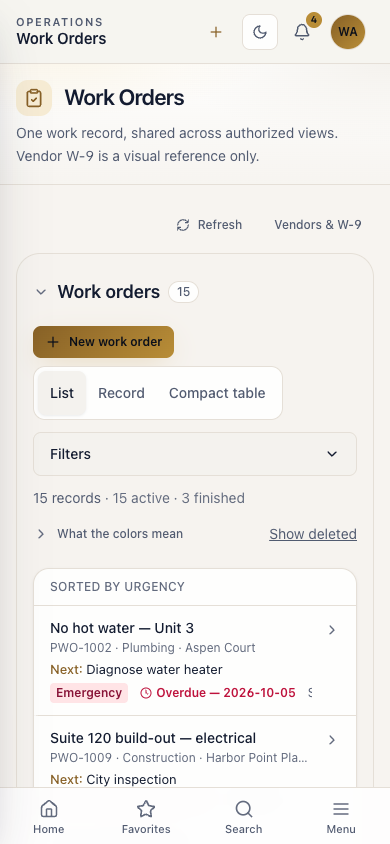
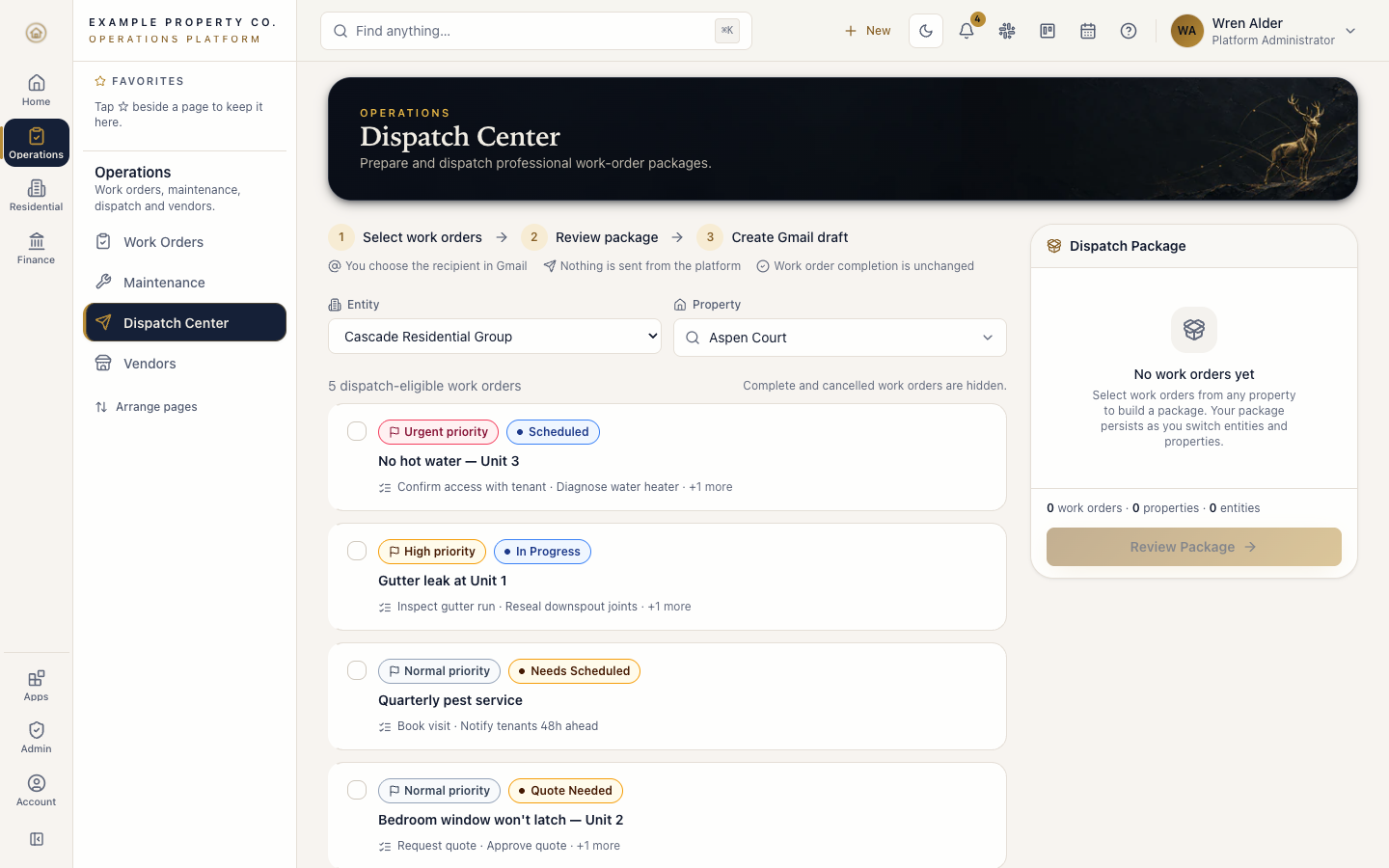
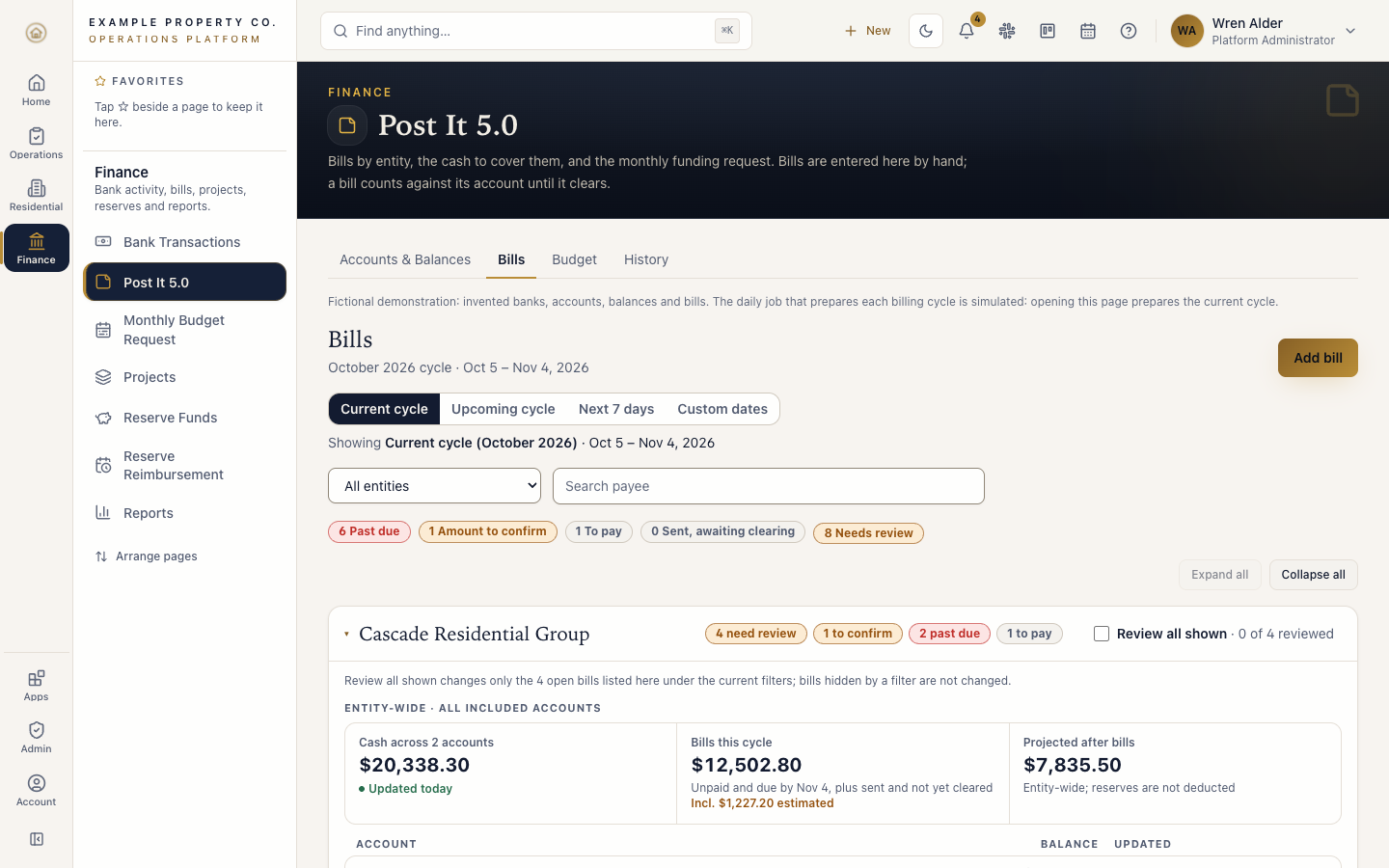
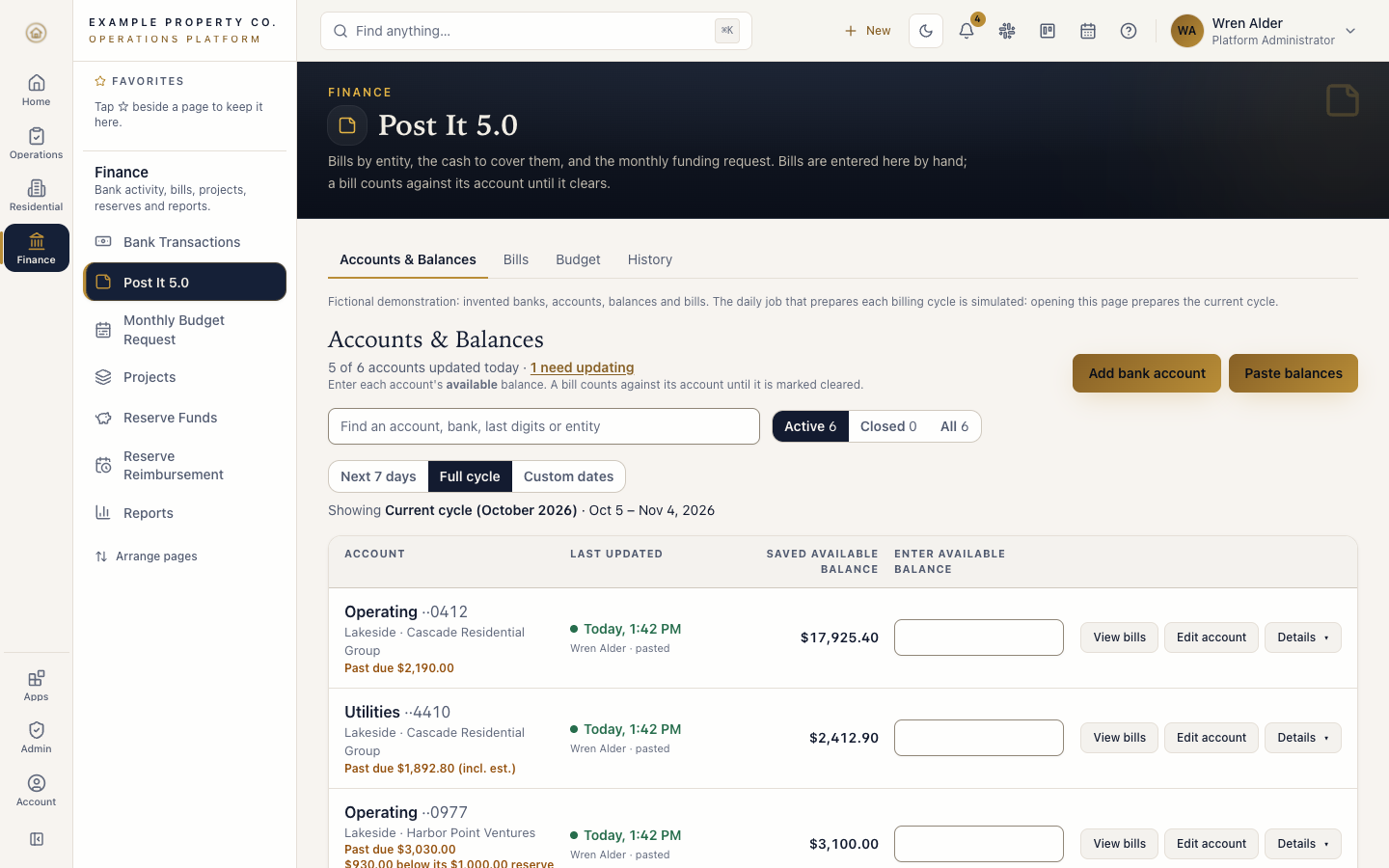
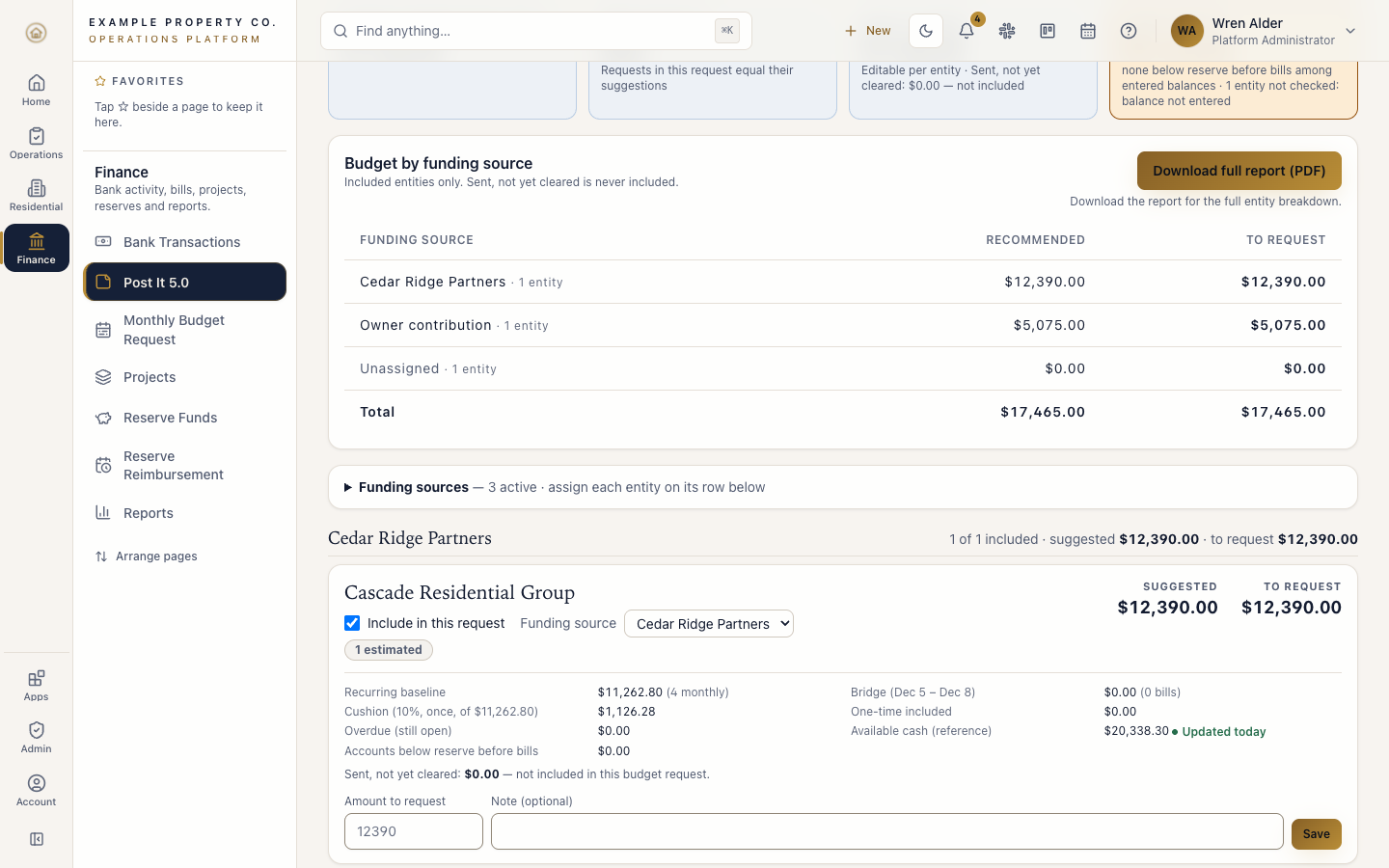
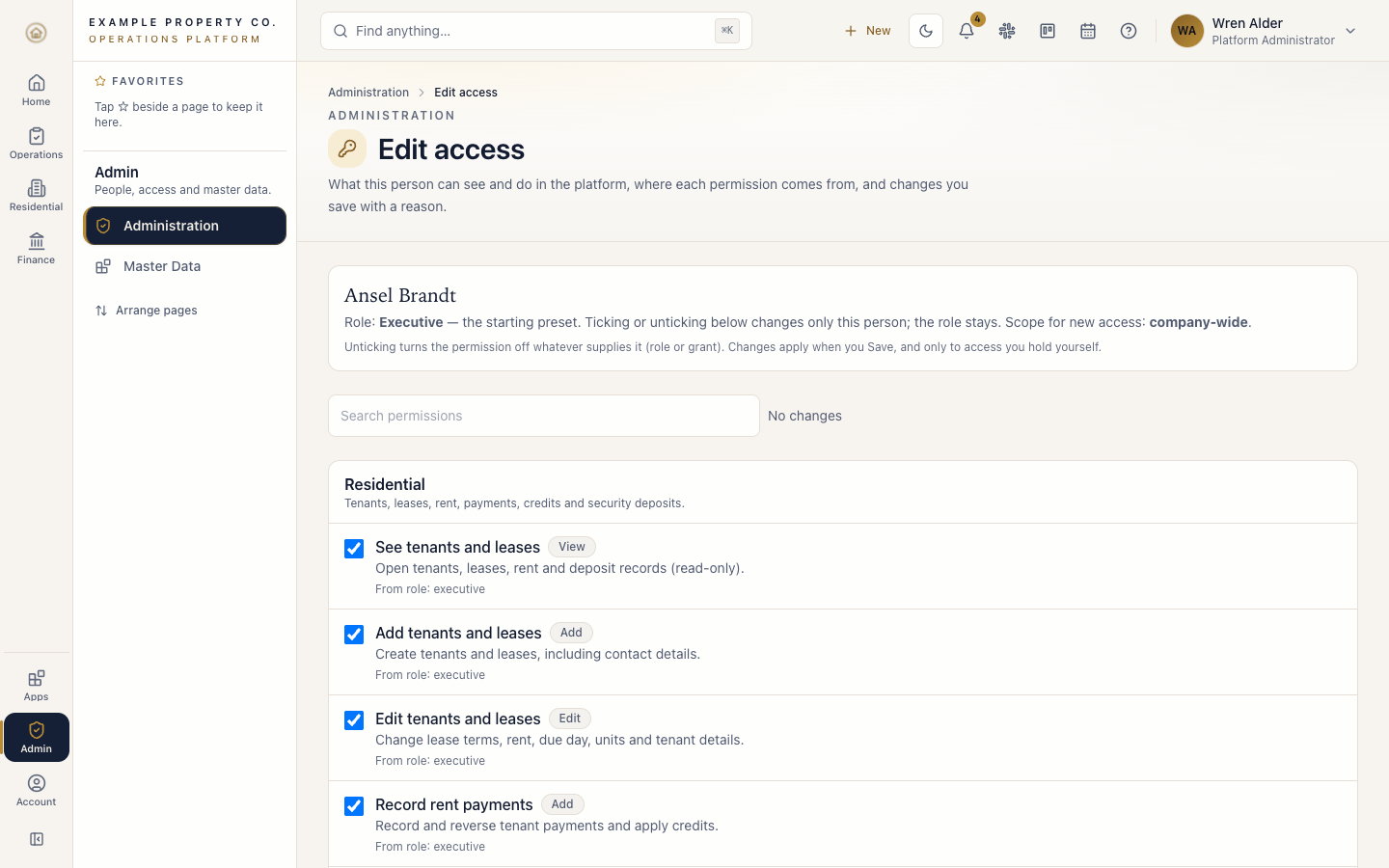
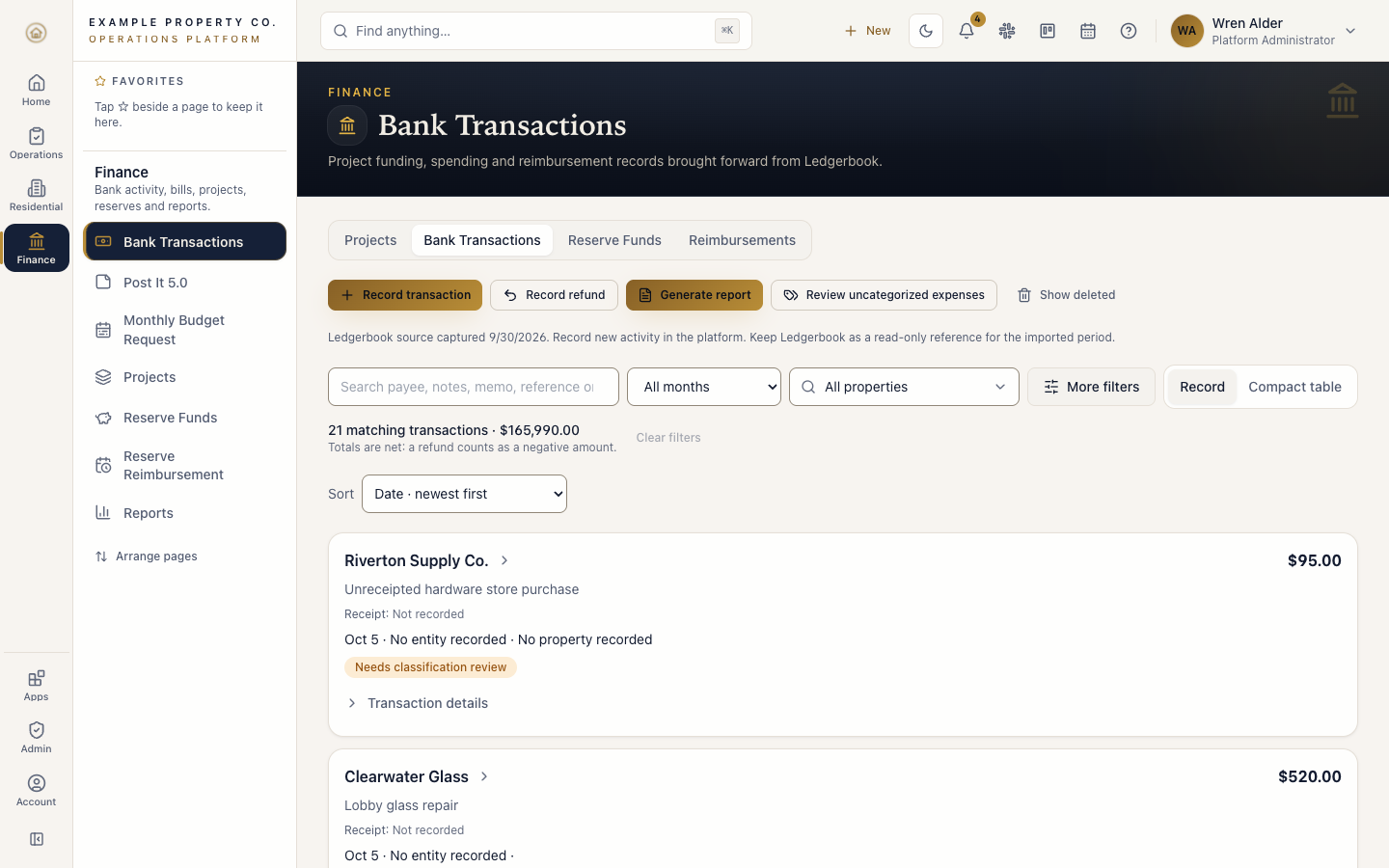
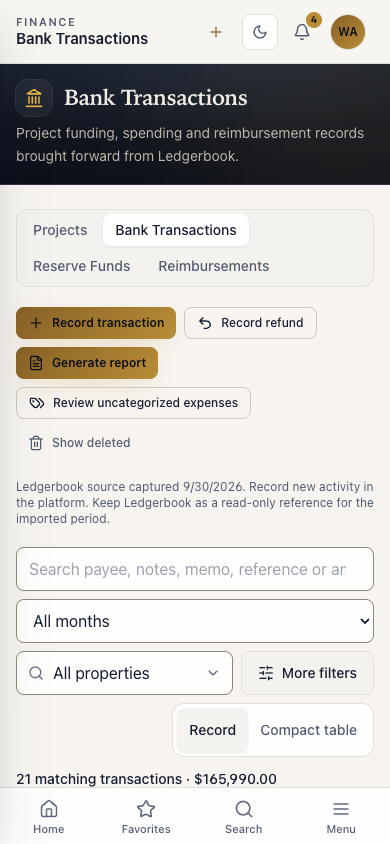
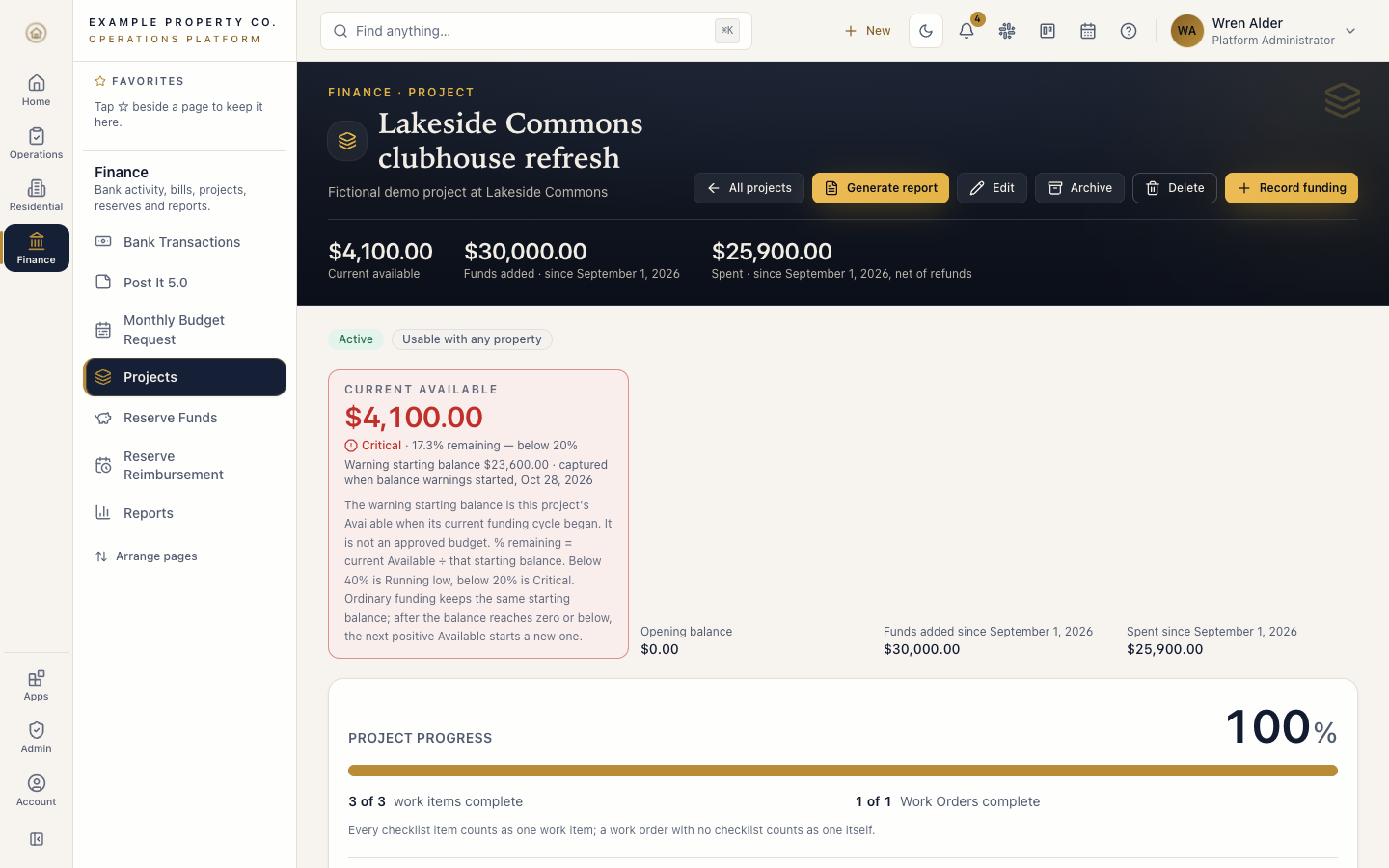
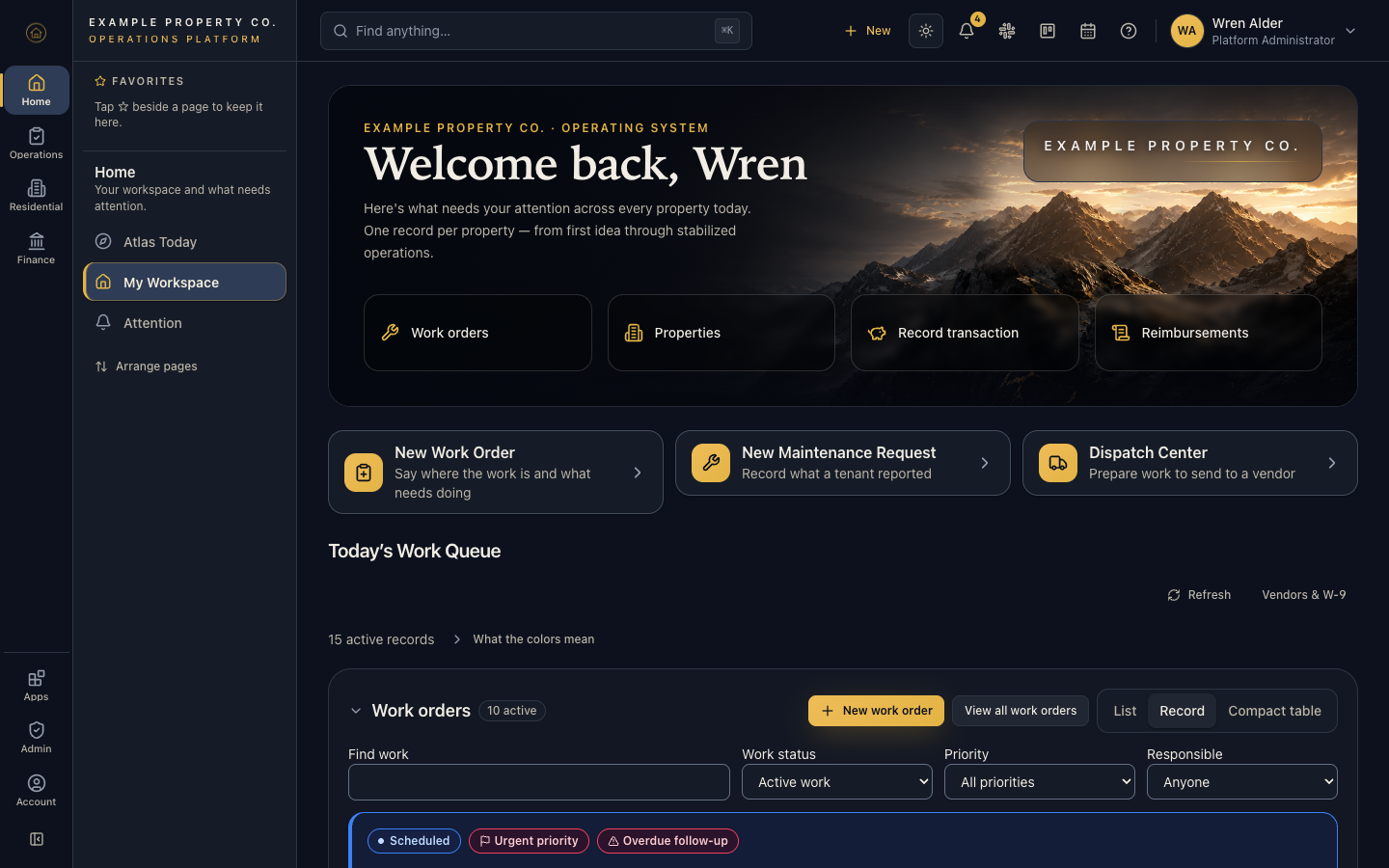
Open the operations app demo to use these screens — or the budget request demo. An earlier spreadsheet-backed web interface has been retired and isn't shown.
Who did what
AI wrote most of the code. The judgment about what to build, how it should behave and whether it was right enough to release was mine.
Me
- Problem framing and requirements
- Workflow, data and screen design
- Priorities and trade-offs
- Acceptance testing on real devices
- Release approval and rollout
- Onboarding and support
AI assistants
- Claude Code: implementation and automated tests, under my direction
- ChatGPT: strategy and planning partner
- Gemini: spreadsheet formulas in the early workbook
Colleagues
- Explained how the work really happens
- Reported problems from the field and office
- Leadership set priorities and approved access
Adoption and the feedback loop
Rollout happened one role at a time — operations coordination, field lead, finance and leadership, then compliance — each with their own sign-in, two-factor setup and home workspace.
The most useful work often came straight from users:
- A wrong assignment in the field was traced to a label that implied responsibility the data model didn't have. I fixed both — the wording and the model, so the responsible person is chosen when work is created.
- An access request went unnoticed because nothing notified the people who could approve it. The next day, requests notified exactly the administrators allowed to decide them.
- Unit navigation proved confusing while onboarding a new colleague. Two releases the same day made each unit open its current lease directly — and I accepted the change after testing it that afternoon.
- Training on the newer finance features. After a training session in October, the operations coordinator used them, including Bank Transactions, without problems. That's my report of one person's experience, not a measured result.
Results
- Delivered: one shared system replaced scattered sources for work orders, leases, rent, project balances and reports, and the old tools were retired.
- Adopted: office, field, finance and leadership staff were onboarded by role, each with their own sign-in and home page.
- Efficiency: in my observation colleagues work more efficiently, but it hasn't been measured, so I don't put a number on it.
- Scope: my responsibilities grew from budget tracking to owning the company's operating systems.
Limits and lessons
- Measure before you change. I didn't capture baselines early, so the impact is qualitative. For the next workflow I'll record tasks, follow-ups and time spent first.
- Say what a safeguard can't do. The job watcher runs inside the database, so it can't notice the scheduler itself stopping. That limit was written down and later covered by an outside check, rather than calling the system fully monitored.
- Security is ongoing. Access rules are tested by deliberately attempting what should be refused, at the database as well as on screen, and security work continues with each release.
- Prove definitions cheaply first. Starting in a spreadsheet let the company agree what a "project balance" means before it was built into software.
- AI speed needs discipline. Fast AI implementation only helped because every change was small, reviewed, verified and written down. How that works →
Evidence and attribution
Where each claim on this page comes from. "Record" means dated release records; "My report" is my own account, not independently measured; "Plan" is not done yet. Private records stay private — they're available to discuss in an interview.
| Claim | Source | Type |
|---|---|---|
| Starting conditions (fragmented information, balances assembled by hand, no daily view) | My account of the starting point | My report |
| Knowledge base started late June; spreadsheet command center in July | Dated project records | Record |
| Web interface live early September; platform released mid-September | Dated release records | Record |
| Work orders imported and the old tool retired, late September | Dated release records | Record |
| Rollout by role; finance features late September – early October; reliability work in early October | Release history and onboarding records | Record |
| Operations coordinator used the newer finance features without problems after training | My account of one colleague's experience — not independently observed | My report |
| Job watcher's blind spot written down; outside check added later | Release records | Record |
| Assignment fix, access-request notifications, unit navigation fix | Dated release records; the last also accepted by me | Record |
| Colleagues working more efficiently | My observation — not measured | My report |
| Platform screenshots | The platform's interface on a browser-local demonstration database; invented data; branding and names replaced | Record |